
 How to prepare for a PECB Exam: study tips and preparation for the exam
 How to prepare for a PECB Exam: study tips and preparation for the exam
Practical preparation tips and exam-day advice
Preparing for a PECB exam? This article explains how PECB exams work, what to do before exam day, how to prepare your study material, and how to approach the examination strategically. With the right preparation, there should be very few surprises on exam day. NIS Institute trainers share their practical tips to help you prepare efficiently for your PECB exam, from organising your course material to managing your time during the exam.
Disclaimer: this page provides general guidance based on official PECB information available on 30 August 2026. Current PECB rules, the applicable Candidate Handbook, and the invigilator’s instructions always take precedence.
PECB exams: what you need to know
What types of PECB exams are there?
PECB currently uses three main exam formats:
- Multiple-choice, closed-book: no reference materials are permitted. Foundation and Transition exams are usually delivered in this format.
- Multiple-choice, open-book: authorised reference materials may be used. This format is common for many Manager and Lead exams.
- Essay-type, open-book: still used for some exam and language combinations, although PECB is gradually transitioning essay exams to multiple-choice open-book exams.
Check the official List of PECB Exams for the exact format, duration, language and number of questions for your certification.
Open-book vs. closed-book exams
A closed-book PECB exam tests your knowledge without reference materials.
An open-book PECB exam allows only the materials authorised for that exam. Open book does not mean open internet, and it does not remove the need to understand the subject. For scenario-based questions, you must still recognise the relevant principle, requirement, role or sequence. Your references should help you verify an answer quickly, not replace proper preparation.
What materials are allowed?
Depending on the exam type, PECB may permit:
- the main standard in hard copy;
- PECB training course materials accessed through the PECB Exams application and/or printed;
- personal notes taken during the training course, accessed through the application and/or printed;
- a hard-copy dictionary.
Check your exam-specific rules
Permitted materials can vary. Do not assume that related legislation, books, websites or additional standards are allowed simply because they are relevant to the subject. The Candidate Handbook and current PECB rules take precedence.
How do you book your PECB online exam?
After completing a PECB training course, schedule the exam through your myPECB dashboard (mypecb.com) and:
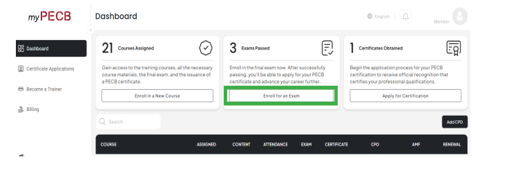
- open the relevant course in your dashboard and select the exam option;
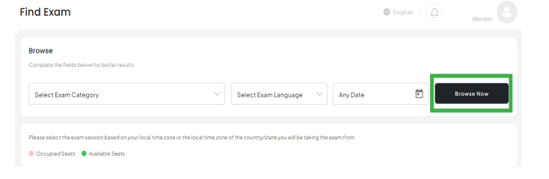
- choose the exam language and an available date and time;
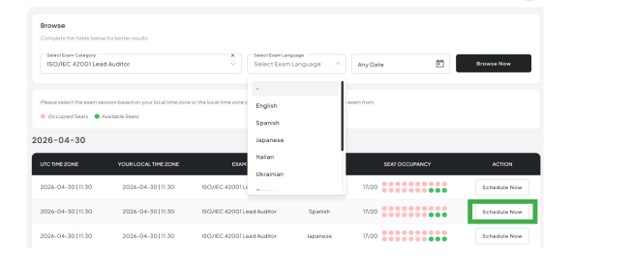
- Available seats and several dates/timeslots to book your exam will be presented;
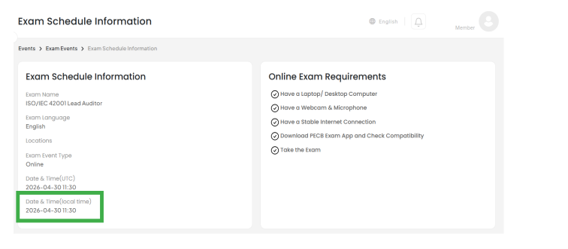
- review both the UTC time and your local time carefully;
- accept the PECB Exam Rules and Online Examinee Manual, then confirm the booking.
- your confirmation email contains the examination details and a link to the PECB Exams application.
Step 1: enroll for exam
Step 2: select your exam (pay attention to the course and langauge)
Step 3: pay attention to the time, UTC versus your local time
Step 4: schedule the exam
How are PECB exams supervised?
PECB online exams are delivered through the PECB Exams application and remotely supervised by an authorised invigilator using your integrated or external camera. The invigilator verifies your identity and examination environment, monitors the session and can assist with technical issues. They cannot interpret questions or help with answers.
When do you receive your result?
- Online multiple-choice exams: you see your exact grade immediately after submitting the exam, followed by an email confirming the result.
- Essay-type exams: PECB communicates a pass or fail result by email, normally within three to eight weeks.
What happens if you do not pass and fail the exam?
First of all, failure is a learning opportunity to do better. If you fail, you can always contact your NIS Institute trainer to help you revise or answer your questions. Most important: read the tips again and study the content.
Students who completed eligible training, eLearning or self-study through a PECB Partner receive a first exam attempt and one free retake as part of the training package. Both attempts must be completed within the applicable 12-month period. After an unsuccessful first attempt, there is no grace period to take a second attempt. Online retakes are scheduled through myPECB and you can use the same voucher code.
Before the exam
Install the PECB Exams application
Download the latest PECB Exams application for Windows or macOS and install it on the computer you will use for the exam. Link: https://pecb.com/en/pecb-exams
PECB advises candidates to run the built-in “Check Compatibility” function well before exam day. Proceed only when all compatibility indicators are green. Test the same computer, camera, microphone, network and room you intend to use for the exam.
TIP: NIS Institute recommends completing this check at least 48 hours in advance so if something wrong you still have enough time to find a solution.
Check your computer and internet connection
A personal computer is generally safer than a work device because corporate firewalls, antivirus software, pop-up blockers and domain policies can interfere with the examination application. When a work device is unavoidable, contact your system administrator well in advance and ask them to approve the application.
Special note for candidates in Belgium / Proximus
The current PECB Online Examinee Manual lists Proximus among internet service providers that may block ports used by the PECB Exams application. Proximus customers should run the compatibility test early and contact their ISP or system administrator if the check fails.
Prepare your exam environment
Use a quiet, well-lit, clutter-free room where you can remain alone. Your setup should contain one computer, one monitor, one keyboard and one mouse. Be prepared to rotate the camera through 360 degrees when requested by the invigilator.
What identification do you need?
Have a valid, unexpired government-issued identity document ready. The invigilator will ask you to display it during verification, do not upload the identity document into the application unless you asked to do so. If the camera image is not clear enough, you may be asked to upload an image through the application. Follow the privacy instructions shown by PECB when displaying or uploading identification.
What is not allowed during the exam?
Current PECB online exam rules prohibit:
- a second monitor, phone, tablet or other secondary electronic device;
- headphones, headsets or headbands;
- Google, search engines, email, social media, chat tools or other websites;
- ChatGPT or any other external AI application;
- recording the exam or taking screenshots of questions;
- reading questions aloud or communicating with another person;
- a pen or other physical writing instrument during the online exam.
TIP: Mute your mobile and make sure you’re in an isolated environment, without any interference from people.
Practical study tips from our NIS Institute trainers
The best way to prepare for a PECB exam is to combine understanding, targeted practice and efficient use of the official course material. The following PECB exam tips are practical recommendations from NIS Institute trainers, not additional PECB rules.
For each exam
Download and print the relevant legislation and ISO standard(s).
Time of your exam
Most exams have a time of 180 minutes to complete the exam.
TIP: if you are a non-native English speaker, you get 30 minutes extra but only if you tick the box when starting the exam.

Understand, don’t just memorise
For each topic, ask why it matters, who is responsible, when the activity takes place, what should happen before and after it, and what evidence would demonstrate correct implementation. This is especially important for scenario-based Manager, Lead Implementer and Lead Auditor questions.
Know the structure of your course material
Understand how the clauses, processes and roles connect. For an ISO management-system course, for example, context, leadership, planning, support, operation, performance evaluation and improvement form one coherent cycle. A clear mental map is more useful than isolated facts. During revision, identify where the course covers definitions, clauses, risk, roles, implementation steps, audit principles, evidence and improvement.
In a PECB open-book exam, the goal is to know approximately where to look before you open the material.
Prepare your open-book reference material
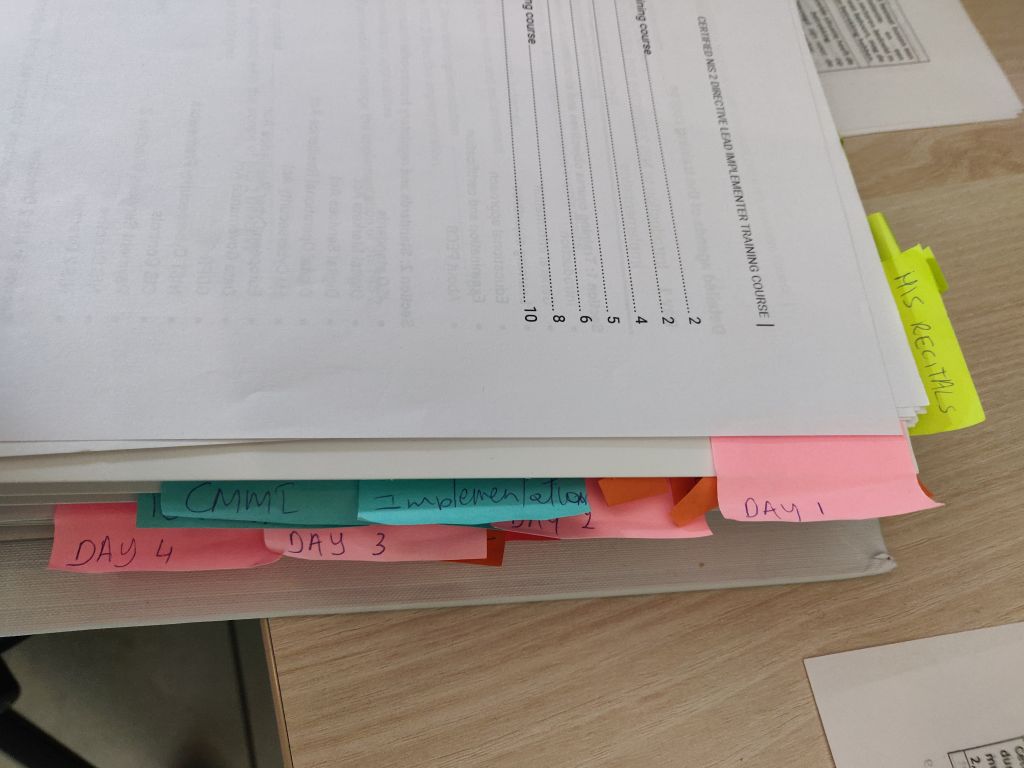
When printed material is permitted, use a number of clear tabs for major sections. Mark only information you expect to revisit. Too many tabs slow you down. Keep your personal notes short and focused on concepts you regularly confuse.
- Use tabs and page markers
- Indicate the days and important chapters/concepts/articles from legislation
- Focus on concepts, terminology and relationships
- Practise with the provided exercises and quizzes in the course material
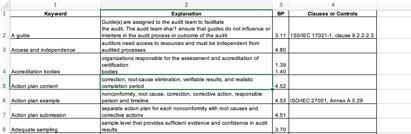
- Create your own quick-reference notes or a key-word index (use for example Excel)
Example of a tabbed course

Example of an key-word index
Should you print your course material?
Use the format that lets you find information fastest. Printed materials can be easier to scan and allow you to keep the question visible. We recommend printing the course if it’s not already provided to avoid flipping screens throughout the exam.
Practise with the same setup you intend to use during the exam.
How much time should you leave between training and exam?
There is no single correct interval. As a practical target, many candidates benefit from scheduling the exam two to four weeks after training: long enough for several focused revision sessions, but close enough to retain the course structure and examples. Adjust this to your prior experience and available study time.
During the Exam
PECB exam application
The application displays one question at a time. Use “Save and Previous” or “Save and Next” so your answer is stored. Use “Mark for Review” for questions you want to revisit. If you need technical assistance or a permitted break, contact the invigilator through the “Need Help” button rather than opening another application.
Multiple choice
The multiple choice exam format has two types of questions. Regular multiple choice questions with three answer possibilities and scenario based question with also three answer possibilities. There is no gis-correction applied.
Use the three-pass strategy
- First pass: answer what you know and move steadily through the exam. Answer clear questions and mark uncertain ones for review.
- Second pass: analyse difficult questions Return to marked questions, eliminate weaker options and identify what the question is actually testing.
- Third pass: consult your references. For an open-book exam, use the remaining time to verify only the questions that genuinely require it.
Reserve the final 15 to 20 percent of your time for marked and unanswered questions. PECB’s online manual states that there is no penalty for an incorrect answer, so aim to answer every multiple-choice question.

TIP: you can review/ mark questions if you’re unsure of the answer – you can always go back to previous questions
TIP: only change an answer if you know it is wrong and validate it. Don’t change the answer if you’re not sure. Remember that your first answer/feeling is most probably the right one.
Pay attention to words such as BEST, FIRST, NOT and EXCEPT
Read each question carefully, especially words such as BEST, MOST appropriate, PRIMARY, FIRST, NEXT, NOT and EXCEPT. Several options may be technically possible, while only one answers the precise question being asked.
Don’t spend too long on one question
A difficult question should not prevent you from answering several easier ones. Mark it, continue and return later. For an open-book exam, search the most likely section instead of scanning the entire course from the beginning.
Review before submitting
Check unanswered questions, items marked for review and questions containing negative wording. Confirm your final decision before selecting “Submit Exam”. After submission, close the PECB Exams application immediately; PECB notes that the invigilator can retain access to the camera feed until the application is closed.
What to do if you experience a technical issue
Use the “Need Help” function in the exam application and follow the invigilator’s instructions. Do not open email, messaging, remote-access or other prohibited applications. If the connection drops, attempt to rejoin promptly; the current manual warns that being offline or out of the room for more than ten minutes can lead to termination of the session.
Official PECB resources and links
PECB Exam Rules and Policies: Exam formats, permitted materials, results, retakes and security rules.
List of PECB Exams: Current exam type, language, duration, number of questions and Candidate Handbook.
PECB Online Examinee Manual: Application setup, technical requirements, identification, invigilation and online exam rules.
PECB Exams Application: Official Windows and macOS application download page.
PECB Help Center: Current step-by-step guidance for scheduling and managing an exam.
Prepare for Your PECB Certification with NIS Institute
NIS Institute combines official PECB course content with practical explanations, exercises and guidance from experienced trainers.
Explore the full training catalogue and choose the format that fits your objectives.